Integrations

Seeqly integrations for AI visibility.

Connect the tools you already use. Each one answers a specific question about what happens before and after an AI assistant mentions your brand.

Integrations are rolling out now. Ask which are ready for your stack

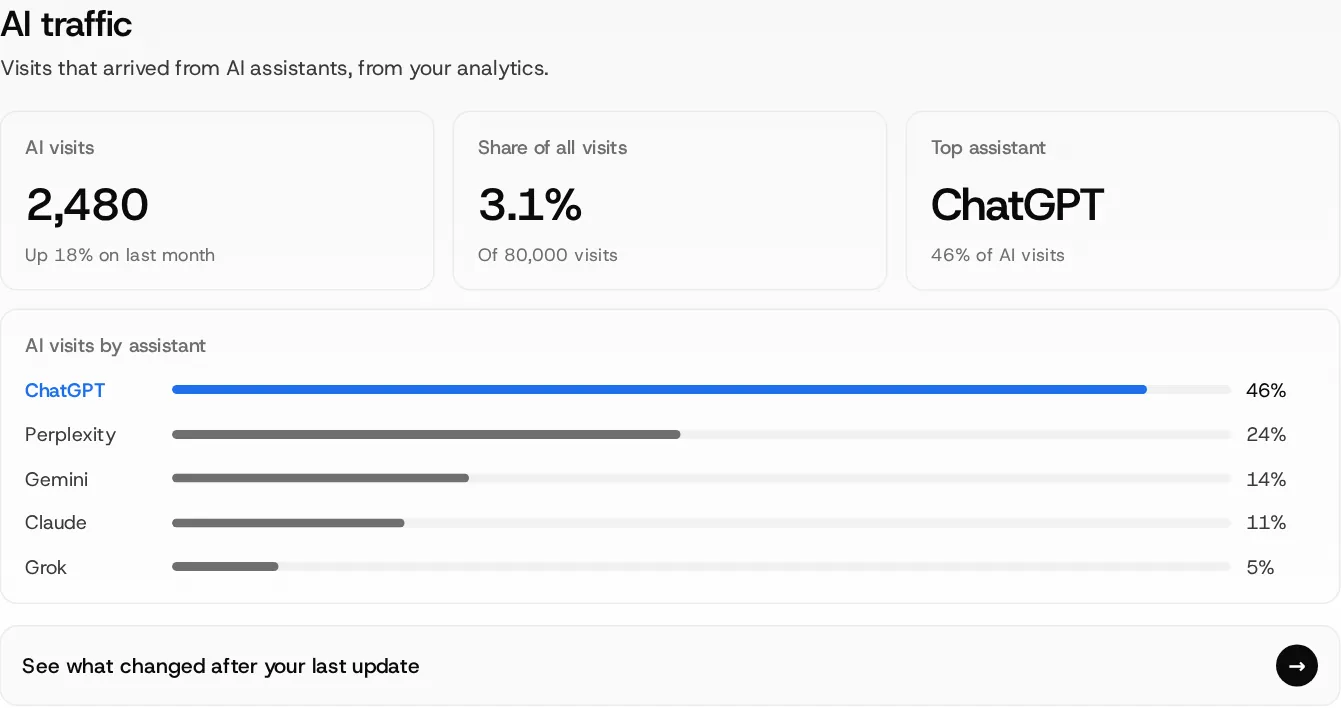
Seeqly AI traffic view
AI traffic
Data sources

One question per integration.

Google Analytics 4

“What did AI visitors do after they arrived?”

What you see in Seeqly
  • AI visits and their share of all your visits
  • Which assistant sends the most visitors
  • Landing pages AI visitors reach, and what they did next
See AI traffic in the product

Google Search Console

“Which search queries overlap with AI questions?”

What you see in Seeqly
  • Search queries that match the buyer questions you track
  • Questions buyers ask AI but rarely search for, and the reverse
  • Prompt ideas taken from your real search queries
See Topics & prompts in the product

Your store

“What are your real product facts and prices?”

What you see in Seeqly
  • AI-quoted prices checked against your real prices
  • Product facts AI leaves out or gets wrong
  • Shopify, WooCommerce, BigCommerce, Adobe Commerce (Magento) or a product feed
See Products & shopping in the product

HubSpot

“Which leads and deals came from AI answers?”

What you see in Seeqly
  • Leads and deals matched from the first-touch source
  • Pipeline by assistant, month on month
  • Records that cannot be matched are labeled, never guessed
See Impact reports in the product

ChatGPT Ads research

“What do ads promise beside the answer?”

What you see in Seeqly
  • Sponsored placements observed next to the questions you track
  • Who runs each ad and the page it sends buyers to
  • What the organic answer says beside it

Built from placements Seeqly observes. It is separate from your ad account and does not connect to it.

See ChatGPT Ads research in the product

Server and CDN logs

“Which pages can AI crawlers actually reach?”

What you see in Seeqly
  • Crawler, page and HTTP status for every AI bot request
  • Verified bots separated from look-alikes
  • Blocked pages linked straight to the fix
See AI crawler logs in the product
For developers

Take your data where you work.

Pull Seeqly numbers into your own reports, or let an assistant read them for you.

Advance and Pro

Seeqly API

“Can I use these numbers in my own dashboards?”

What you get
  • Visibility, answers, brands named and sources cited, by campaign
  • The same counts you see in the app, such as 1,351 of 3,000 answers
  • Included on the Advance and Pro plans
Compare plans

Seeqly MCP server

“Can my AI assistant read my Seeqly data?”

What you get
  • Ask questions about your campaigns from an MCP-compatible assistant
  • Answers come from your saved Seeqly data, with counts

Not available yet. Join the early-access waitlist.

How connecting works

Useful on day one. Sharper when connected.

You never wait for an integration to see what AI says about you.

  1. 1Start without connecting anything

    AI answers, brands named, sources cited, perception and ranked fixes all come from Seeqly’s own daily runs. You see them on day one.

  2. 2Tell us your stack

    Let us know which analytics, store, CRM and hosting you use. We will tell you which integrations are ready for it today.

  3. 3Connect from your workspace

    When an integration is ready for you, an admin connects it from workspace settings with the tool’s own sign-in.

  4. 4See the answer in context

    Connected data appears beside the AI answers it relates to. Anything we cannot match is labeled, not guessed.

Works on day one
  • Answers from ChatGPT, Google AI Overviews, Gemini, Claude, Perplexity and Grok
  • Brands named, position and share of voice
  • Sources and citations behind each answer
  • Wrong claims checked against facts you approve
  • Ranked fixes and page briefs
Adds when connected
  • AI visits and what visitors did next (GA4)
  • Search queries beside AI questions (Search Console)
  • Real prices and product facts (your store)
  • Leads and deals from AI referrals (HubSpot)
  • Which AI crawlers reach your pages (logs)
Questions

About integrations.

Anything else? Talk to us.

Are all integrations live?

Not yet. Integrations are rolling out, and availability depends on your stack. Ask which are ready for yours and we will tell you plainly.

Do I need to connect anything to start?

No. Seeqly collects AI answers itself, so visibility, sources, perception and fixes work without any integration. Integrations add what happened after the answer: visits, orders, leads and crawler access.

Which store platforms will Seeqly support?

Shopify, WooCommerce, BigCommerce and Adobe Commerce (Magento), or a product feed if you run something else.

Does ChatGPT Ads research need my ad account?

No. It shows sponsored placements Seeqly observes beside the questions you track. It is separate from your ad account and does not change your ads.

Will Seeqly change anything in my tools or on my site?

No. Seeqly reads the data it needs to answer each question. It suggests fixes, and nothing changes on your site until your team approves it.

Which plans include the API?

The API is included on Advance and Pro. See pricing for current limits.

My tool is not listed. Can you add it?

Tell us what you use. Contact us with your stack and the question you want answered.

Start with the answers. Connect the rest later.

Basic is free for 7 days, and nothing needs to be connected to begin.