Keyword Tracking Watched Rankings. Campaigns Watch Answers.
Keyword tracking watched rankings. Seeqly Campaigns watch answers: define a buying intent, attach the prompts buyers actually ask AI, and measure your mention share over time.
Every team that starts measuring AI visibility makes the same first attempt: a big flat list of prompts, run against ChatGPT, exported to a spreadsheet. And every team hits the same wall — the list tells you whether you were mentioned, but not where it matters. Campaigns are how Seeqly solves that: instead of a prompt list, you define a buying intent, and track it like the funnel stage it is.
The short version
- A Campaign is a predefined intent — "evaluators comparing us against X", "teams discovering the category" — with the prompts that express it attached.
- Seeqly samples those prompts across ChatGPT, Gemini, and Perplexity on a schedule and reports mention rate, citations, position, and share of voice per intent — a trendline, not a screenshot.
- Intent-level tracking is what makes the data actionable: a gap in comparison prompts and a gap in discovery prompts have completely different fixes.
Why flat prompt lists fail
The problem with a flat list isn't effort — it's interpretation. Say your spreadsheet shows a 40% overall mention rate. Is that good? You can't know, because the number blends prompts with entirely different jobs. Being absent from "what is generative engine optimization" costs you a reader. Being absent from "best AI visibility platforms for B2B SaaS" costs you a deal. Averaging them produces a number that moves without meaning.
There's a second, sneakier failure: LLM answers vary between runs. Ask the same assistant the same question five times and the brand list shifts. A single manual check is an anecdote — real measurement needs repeated sampling and rates, which is spreadsheet-hostile work. (It's the same reason prompt tracking is a statistical discipline, not a screenshot habit.)
Keyword tools solved this for search twenty years ago by grouping keywords into campaigns with intent labels. AI visibility needs the same structure — built for answers instead of rankings.
What a Campaign is
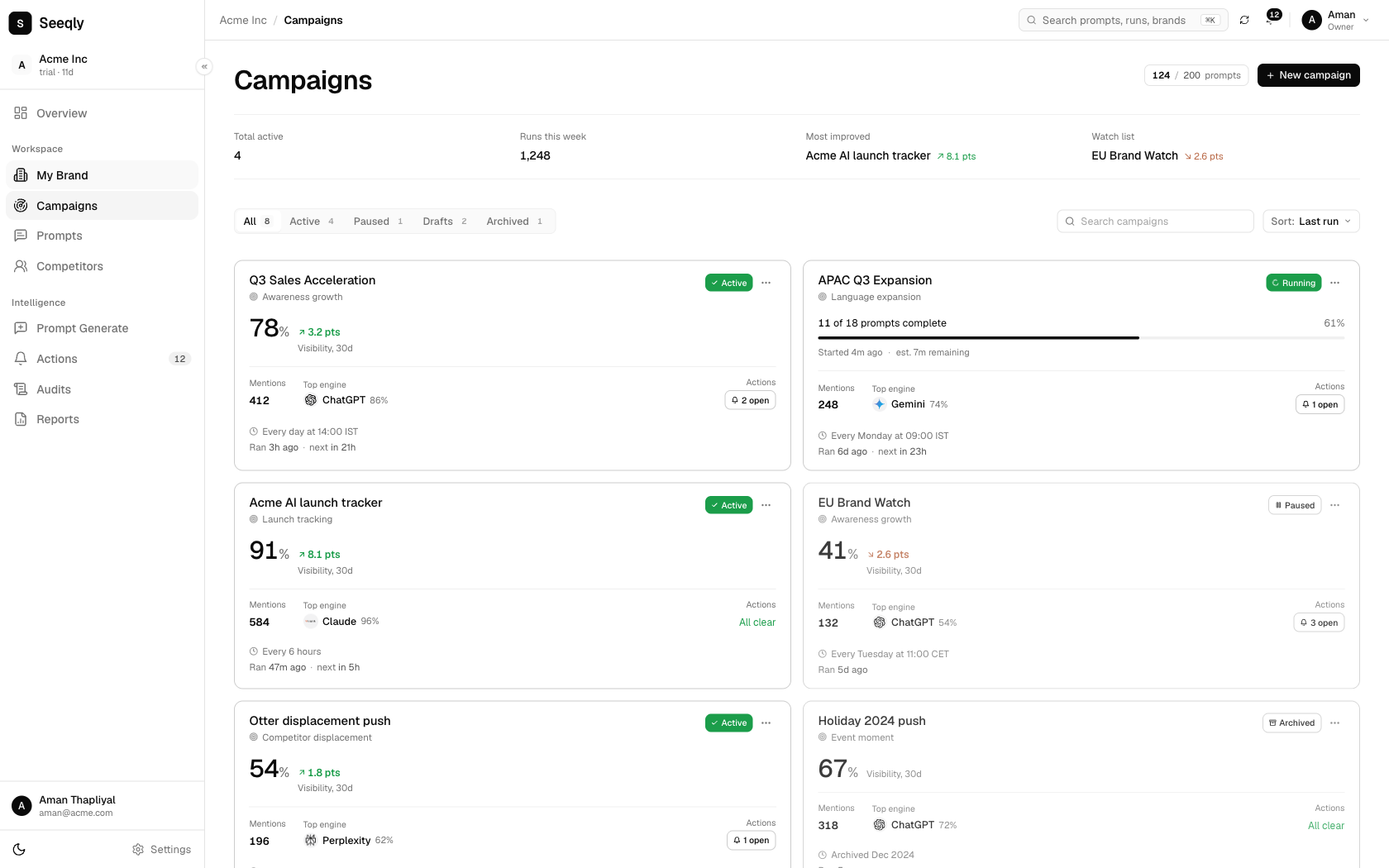
In Seeqly, a Campaign starts from the intent, not the prompts. You define what you want to track — a slice of your buyer's journey, stated plainly:
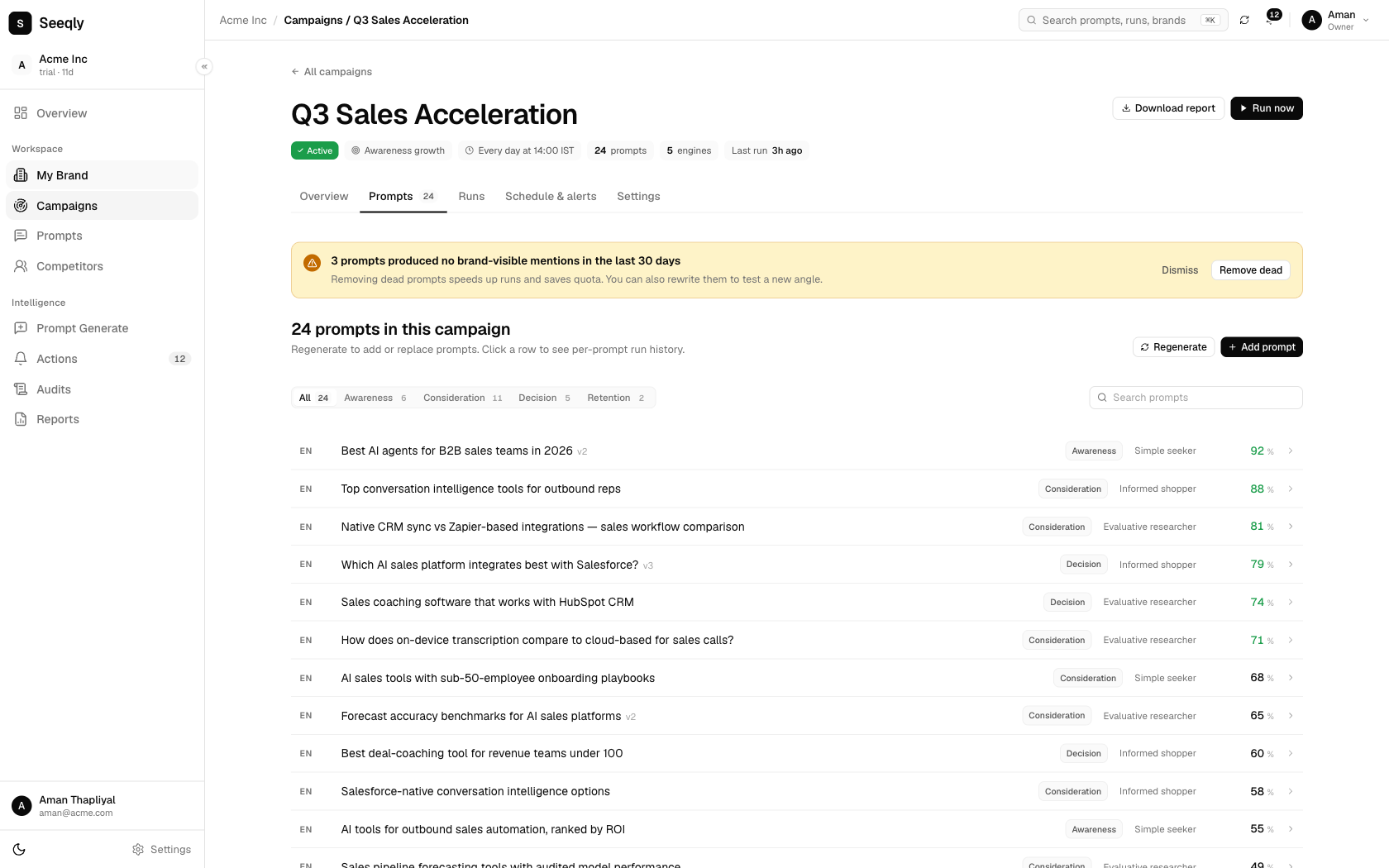
- Category discovery: "growth leads realizing AI search visibility is a thing" → prompts like "how do I know if ChatGPT recommends my brand?", "what is GEO and do I need it?"
- Solution comparison: "evaluators building a shortlist" → "best AI visibility tracking tools", "[competitor] alternatives", "Seeqly vs [competitor]"
- Problem-triggered: "teams whose traffic dropped despite rankings" → "rankings stable but organic traffic down — why?"
- Brand verification: "buyers checking you out" → "is [your brand] legit?", "[your brand] reviews"
Attach the prompts that express that intent (write your own, or start from suggestions and refine), pick the assistants to monitor, and the Campaign runs: scheduled sampling across ChatGPT, Gemini, and Perplexity, every answer logged and parsed.
What comes back
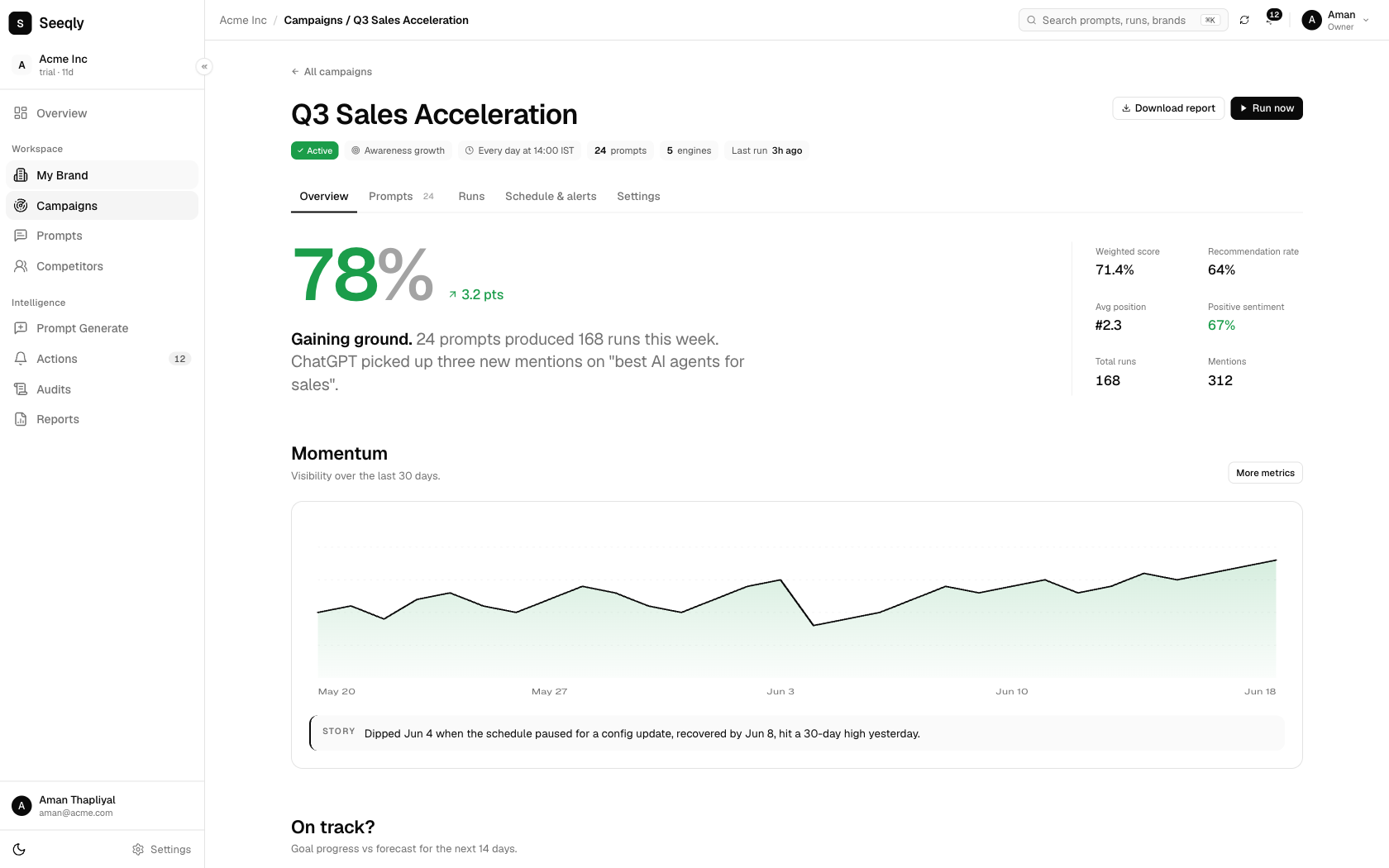
Each Campaign reports the metrics that map to how AI answers actually behave:
- Mention rate — the share of sampled runs where you appear, per prompt and per intent. The core number, tracked as a trendline.
- Share of voice — your mentions versus each named competitor. Answers hold only three or four brand slots; this shows who holds them, per intent.
- Position and sentiment — first-named or last, recommended or merely listed, described accurately or not.
- Citations — which sources each assistant leaned on. This one quietly becomes your roadmap: the domains cited for your money prompts are the exact surfaces where corroboration will move your numbers.
Because Campaigns are intent-scoped, the diagnosis is built in. Weak in discovery? That's an education-content gap — the assistant doesn't associate you with the category yet. Weak in comparison? That's a corroboration gap — review presence and comparison content on the cited domains. Weak in brand verification? Check what the assistants are actually saying about you, because buyers are reading it verbatim. One structure, three different playbooks — visible only because the intents were separated.
An honest note on what this doesn't do
Campaigns measure and diagnose; they don't write your content or earn your reviews. And we won't promise that tracking alone lifts your mention rate — measurement never moved a metric by itself. What it does is end the guessing: you learn where you stand, which gap matters most, whether each fix worked, and what your competitors' trendlines look like next to yours. In a channel where 69% of buyers change vendor choice based on AI guidance, knowing beats hoping by a wide margin.
Setting up your first Campaign in an afternoon
- Pick one intent that touches revenue. Comparison intent is usually the right first pick — it sits closest to the deal.
- Write 20–30 prompts the way buyers talk. Not keywords — questions, with context: "best [category] for [company size / stack / constraint]". Steal phrasing from sales calls and support tickets.
- Name the competitors you want benchmarked. Share of voice needs a denominator.
- Let it sample for a week before reading anything. Variance is real; trendlines over snapshots.
- Act on the citation report first. It's the shortest path from data to to-do list.
Before you start, spend two minutes on the plumbing: if AI crawlers can't read your site, no campaign insight will save you. Our free AI crawlability checker settles that first — then the Campaign tells you what the machines do with what they can read.
Define an intent. See who owns it.
Set up your first Campaign in Seeqly and find out — with sampled data, per assistant — whether the buyers asking AI about your category are hearing your name or someone else's.
Start your free trialRelated reading
- How AI assistants decide which brands to recommend: the data
- AI search traffic is 1% of visits — and converts at 2.5× organic
- Glossary: Prompt tracking · AI share of voice · AI visibility score
Set up your first Campaign in under 5 minutes
Pick an intent, attach the prompts, choose the assistants to monitor. The dashboard fills in as data lands — no configuration to babysit.
Open Campaigns in Seeqly · Free 7-day trial, no card required.